
Lux Casino Login: Sign In with Phone, Email or Account ID
You can access your Lux Casino account through three different methods: phone number, email address or Account ID. This page covers all three methods, the step-by-step login process and the forgot-password flow.
Login Methods
The login screen has three tabs. Each tab accesses the same account with a different piece of information:
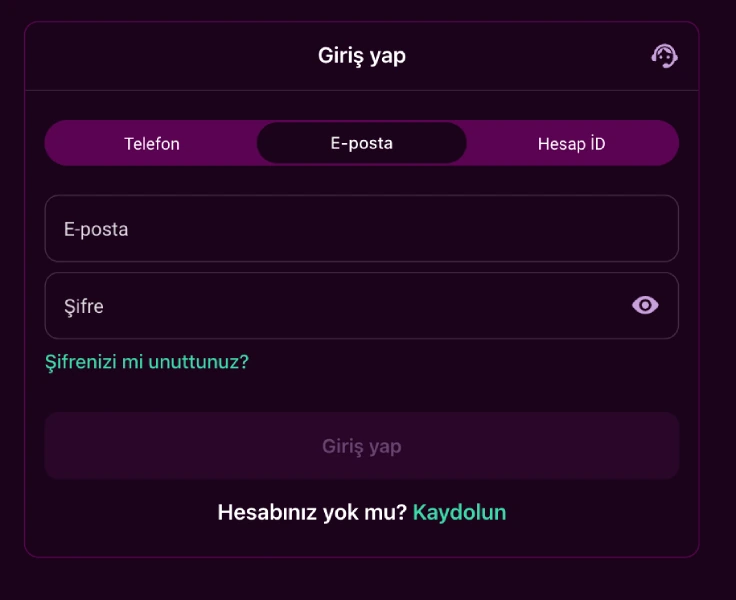
| Method | Required Information |
|---|---|
| Phone | Country code (+90 by default) and phone number, followed by password |
| Registered email address and password | |
| Account ID | Account number and password |
Your Account ID is the account number the system assigns automatically once registration is complete.
In all three tabs, the password field is the same one you set during registration, which must be at least 6 characters long. On the Phone tab, your number is shown in the format +90(XXX) XXX - XXXX, with +90 as the default country code.
Step-by-Step Login
You can sign in to your account in the following order:
- Open the login page and choose the Phone, Email or Account ID tab.
- Depending on the tab you chose, enter your phone number, email address or account number.
- Enter the password you set during registration.
- Click the login button to access your account.
If you're not sure which tab to use, go by whatever you registered with: phone number, email address or the Account ID the system assigned you. If you don't have an account yet, you first need to open one from the registration page.
Account Verification Before Withdrawals
Once you're logged in, three verification steps stand between you and your first withdrawal. The withdrawal screen shows a checklist with these steps:
| Step | What to Do |
|---|---|
| 1 | Confirm your phone number |
| 2 | Confirm your email address |
| 3 | Make your first real-money deposit |
No withdrawal request can be started until all three steps are done. The "Continue verification" button on screen takes you to whichever step is left.
Identity verification runs through KYCAID, an independent verification provider. On the document upload screen, you choose one of the following document types:
- ID card
- Passport
- Driver's license
You can upload your document from a computer. Or use the "continue on your phone" option to move the process to your mobile device. Once you pick the document type, you move on to the file upload step. These checks exist to protect your account and the funds you withdraw.
Forgot-Password Flow
The "Forgot your password?" link on the login screen starts the password reset process. After clicking it, follow the on-screen instructions to set a new password. Once your password is reset, you can log in again using any of the same three methods.
One-Account Rule and Account Security
Under the terms of use, a single user can open only one account; a second account belonging to the same person is closed if detected. The connection is protected with a 256-bit SSL certificate issued by Thawte Consulting. Your login details (phone, email, Account ID and password) should be known only to you and never shared with anyone else.
The company operating the platform is registered under the laws of Curaçao. The terms of use you accept at registration are called the "Offer Agreement" ("Halka Arz Sözleşmesi"), and you can reach the full text through the link in the login screen's consent checkbox. It covers all account, security and login rules.
Transfers between different accounts are not allowed, and transfers from third parties are not accepted either. When you withdraw, funds return through the same method you used to deposit; no other method is used. Every login is also logged with your IP address and browser details. These logs are part of account security and help flag suspicious sign-ins.
Temporarily Suspending Account Access
If you no longer want to log in to your account, the terms of use give you a way out. This right can be used once every 90 days and works as follows:
- You submit your request through your registered email address.
- You confirm the request on the site.
- Your account is closed once any pending payouts are completed.
A request to reopen the account can be sent no earlier than 30 days after the previous request. Accepting that request is at the operator's discretion.
Logging In from a Mobile Device
You can also reach the Lux Casino login page directly from a mobile browser. Android and iOS devices each have their own installation route, and the app is not listed in official app stores. Installation follows one of the two methods summarized below:
| Device | Installation Method | Source |
|---|---|---|
| Android | APK file downloaded via QR code | Direct download (outside app stores) |
| iOS | Shortcut added to home screen | Through Safari |
On Android, installation is completed in these steps:
- Scan the on-screen QR code to download the Android app file, which is roughly 43 MB, then tap "Open."
- Download the file again if needed.
- Grant the permissions requested for installation.
- Tap "Install" to finish the installation.
- Open the app and log in with Phone, Email or Account ID.
iOS devices have no official app store listing. Instead, a shortcut is added to your home screen through Safari:
- Tap the "Share" icon at the bottom of the Safari screen.
- Choose "Add to Home Screen."
- Tap "Add."
- Log in with any of the same three methods from the shortcut on your home screen.
Current installation screenshots are covered on the mobile app page. After logging in, you can explore the rest of the platform from the homepage.
Frequently Asked Questions
I forgot my password, what should I do?
Click the "Forgot your password?" link on the login page. It takes you through the password reset steps.
Can I log in without an account?
No, you first need to complete the registration form. After registering, you can log in with the same phone number, email or Account ID.
Can I log in with more than one account?
No, under the terms of use a single user can open only one account. A second account belonging to the same person is closed if detected.
Can I log in from a mobile device?
Yes, the same three login methods work from a mobile browser or the Android APK. On iOS devices you can also log in through the shortcut added to your home screen.
Frequently Asked Questions
I forgot my password, what should I do?
Click the "Forgot your password?" link on the login page. It takes you through the password reset steps.
Can I log in without an account?
No, you first need to complete the registration form. After registering, you can log in with the same phone number, email or Account ID.
Can I log in with more than one account?
No, under the terms of use a single user can open only one account. A second account belonging to the same person is closed if detected.
Can I log in from a mobile device?
Yes, the same three login methods work from a mobile browser or the Android APK. On iOS devices you can also log in through the shortcut added to your home screen.